- Python 80.7%
- Shell 19.3%
| .gitignore | ||
| discorss.py | ||
| install.sh | ||
| LICENSE | ||
| README.md | ||

DiscoRSS

What is it?
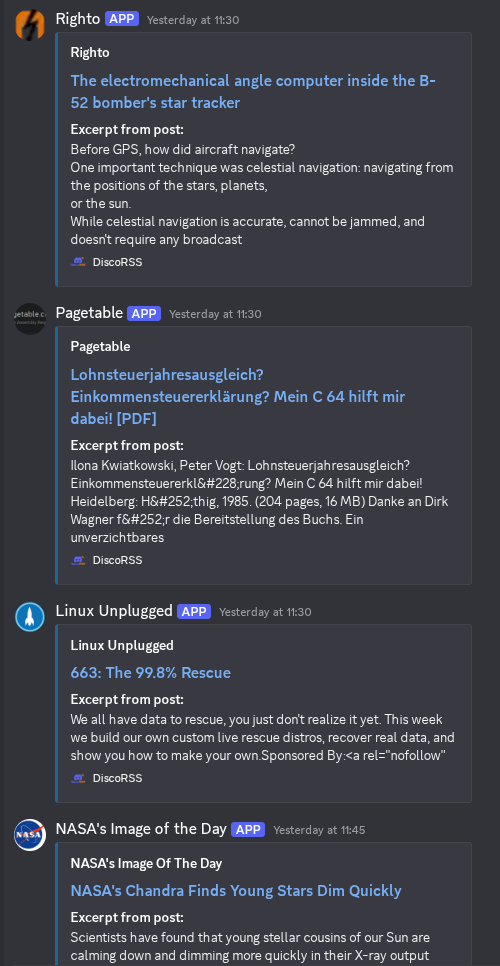
DiscoRSS is a simple Python script to send RSS feeds to Discord webhooks. It was created because existing bots that did this set limits on the number of feeds, and self-hosting stuff is easier and better anyway. To get this working, you will require the following Python libraries:
requests >= 2.4.2
feedparser
The remaining imports should all be part of the standard Python install: hashlib, logging, asyncio, pathlib, json, time, os, sys, argparse, re, types. To install the required ones, use your distro's package manager -- don't use pip unless you want to run the entire script in a virtualenv (which would probably make the systemd unit file a bit more complex, I think you'd have to add a PreExec to activate the virtualenv and a PostExec to disable it?).
Important Notes
By default, DiscoRSS will try and put the logs in /var/log/discorss. Make sure to create this directory and give the user running the script write permissions there. If you want the logs to go somewhere else, just give the path as an argument (shown below). Choose a directory that makes sense. Unfortunately, as far as I know, the XDG standards don't have an equivalent to the /var/log directory in the user directory, so I wasn't sure what the best default was. In the future, we may switch to logging using systemd and journald directly, though it is nice to have a separate file.
Script Arguments
The script has a few different arguments that make it easy to customize certain things:
-d / --dry-run: Just like it says on the tin -- run the script, pull feeds, but don't post anything to Discord-c / --config-file: Give a path to an alternate location for the config file. The default is ~/.config/discorss/discorss.conf and that should be fine for the vast majority of users.-l / --log-file: Give a path to where you want the log file stored. The default is /var/log/discorss/app.log but you will have to create the /var/log/discorss directory and make it writeable by whatever user will be running the script.
How to setup
Automation
New: There is now install.sh in the repo which will automatically help you set up both the config file and the systemd unit files for the service and timer, using essentially the exact text below. It will copy them to the user systemd unit folder, ~/.config/systemd/user and optionally enable the timer. It's a good idea to edit the configuration file at ~/.config/discorss/discorss.conf and paste in your webhook URLs and add any other feeds you want before starting the timer, unless you can do it really quickly before the next 5 minute spot on the clock :)
Of course, if it fires with an invalid config, the script will just crash, and you'll probably just have to manually start the timer once the config is fixed, so not a big deal.
Remember to create /var/log/discorss and change it to be writeable by the user running the service!
Manual method
To automate feed posting, create a systemd service and timer to execute the script.
Use the command systemctl --user edit --full --force discorss.service and then paste in something like this:
[Unit]
Description=Discord RSS feeder
Wants=discorss.timer

[Service]
Type=oneshot
TimeoutStartSec=120
ExecStart=/path/to/discorss.py

[Install]
WantedBy=default.target
The TimeoutStartSec will catch any issues with the script locking up due to, e.g., DNS failures or RSS feeds being slow/unavailable. 2 minutes should be more than enough time unless you are running hundreds of feeds. Also make sure to edit the ExecStart to point to the correct location. Then we need a systemd timer to automatically fire the script. Run systemctl --user edit --full --force discorss.timer and then paste in this:
[Unit]
Description=Timer for DiscoRSS
Requires=discorss.service

[Timer]
Unit=discorss.service
OnCalendar=*-*-* *:00,15,30,45:30
AccuracySec=10s

[Install]
WantedBy=timers.target
To change how often this fires, edit the OnCalendar parameter. The config above has it firing every 15 minutes at half past the minute. Look at the systemd timer man pages for help if you want to tweak it.
Config file format
To configure the script, create ~/.config/discorss/discorss.conf (or have install.sh create it for you) using JSON formatting like this:
{
    "feeds": [
        {
            "name": "Phoronix",
            "siteurl": "https://www.phoronix.com/",
            "url": "http://www.phoronix.com/rss.php",
            "webhook": "webhook url",
            "offset": -18000
        },
        {
            "name": "Pagetable",
            "siteurl": "https://pagetable.com",
            "url": "https://www.pagetable.com/?feed=rss2",
            "webhook": "webhook url",
            "offset": -18000
        }
    ]
}
Create a webhook for each feed (unless you want them all to show as the same webhook for whatever reason) and make sure to add it in to the config. I have it set up with a webhook for each site, each with the site's icon and name set for the webhook which makes the messages look really nice.
The offset should only be required if feeds from the previous 6 hours aren't showing up when you first start the script. This is because feedparser, in its infinite wisdom, just ignores the timezone when converting publish dates from feeds. So most feeds end up with an epoch in UTC. The offset should be the number of seconds between your time zone and UTC. This will eventually be fixed in a future update, I just need to sit down and wrangle with feedparser and datetime some more. All fields are mandatory, if you want to have no offset for example, set it to 0. The name and siteurl are used to create the "author" field in the Discord embed.
Contributing
Want to fix something or make a suggestion? Feel free! If you want to send a pull request, you must run the Python black formatter on the source code before committing. I have this set up in my editor to automatically run every time I save the file, but you could have it run as part of a git hook or something. For non-format stuff, please just follow the code style as best you can. For Python code, I separate multi-word variable names with underscores. So it should be feed_time, not feedTime or FeedTime or feed-time. Don't ask me why, but I use camelCase for other languages... but in Python I've switched to underscores.
If you know how and are able to, please sign your commits with the -S option to git commit. This shows that you are the author, especially if others have signed your keys.