- Rust 97.4%
- Nix 1.7%
- Shell 0.9%
| .cargo | ||
| .github | ||
| crates | ||
| docs | ||
| microfetch | ||
| nix | ||
| scripts | ||
| .envrc | ||
| .gitignore | ||
| .rustfmt.toml | ||
| .taplo.toml | ||
| Cargo.lock | ||
| Cargo.toml | ||
| flake.lock | ||
| flake.nix | ||
| LICENSE | ||



Microfetch
Microscopic fetch tool in Rust, for NixOS systems, with special emphasis on speed
Synopsis
Features | Motivation | Benchmarks
Installation
Synopsis
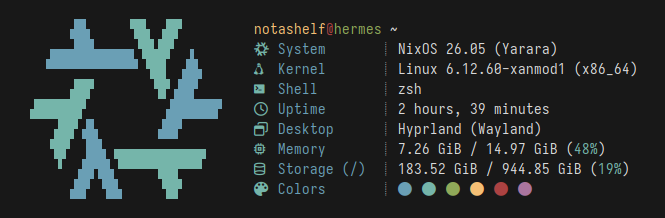
Stupidly small and simple, laughably fast, and pretty fetch tool. Written (mostly) in Rust for speed and ease of maintainability. Runs in a fraction of a millisecond and displays most of the nonsense you'd see posted on r/unixporn or other internet communities. Aims to replace fastfetch on my personal system, but probably not yours. Though, you are more than welcome to use it on your system: it is pretty fast...
Features
- Fast
- Really fast
- No dependencies (not even libc!)
- Tiny binary (~24kb)
- Actually really fast
- Cool NixOS logo, with support for custom logo text
- Reliable detection of following info:
- Hostname/Username
- Kernel
- Name
- Version
- Architecture
- Current shell (from
$SHELL, trimmed if store path) - Current Desktop (DE/WM/Compositor and display backend)
- Memory Usage/Total Memory
- Storage Usage/Total Storage (for
/only) - Shell Colors
- Did I mention fast?
- Respects
NO_COLORspec - Funny 1
Motivation
Fastfetch, as its name probably already hinted, is a very fast fetch tool written in C. I used to use Fastfetch on my systems, but I eventually came to the realization that I am not interested in any of its additional features. I don't use Sixel, I don't change my configuration more than maybe once a year and I don't even display most of the fields that it has. Sure, the configurability is nice and I could configure the defaults that I do not like... but how often do I really do that?
Since I already enjoy programming challenges, and don't use a fetch program that
often, I eventually came to try and answer the question how fast can I make my
fetch script? It is an even faster fetch tool that I would've written in Bash
and put in my ~/.bashrc but is actually incredibly fast because it opts out
of all the customization options provided by tools such as Fastfetch. Since
Fetch scripts are kind of a coming-of-age ritual for most Linux users, I've
decided to use it on my system. You also might be interested if you like the
defaults and like speed. Ultimately, Microfetch a small, opinionated binary with
a nice size that doesn't bother me, and incredible speed. Customization? No
thank you.
I cannot re-iterate it enough, Microfetch is annoyingly fast. It, however,
does not solve a real technical problem. The "problem" Microfetch "solves" is
entirely self-imposed. I want a fast, almost zero-cost command invocation and
for it to not take that much space on my system. Thanks to the nature of Rust,
Microfetch is fast. Rust does, or well, did mean "bloated" dependency trees
and slightly increased build times, though, as of 0.5.0 Microfetch has
(voluntarily) dropped both std and libc. You can go check the numbers for
the speed impact (hint: it's much better) but we also have little to no concerns
left about build times and the binary size. Build times are also very easily
mitigated with Nix's binary cache systems, and since Microfetch is already in
Nixpkgs you are strongly encouraged to use pkgs.microfetch over the flake. The
usage of Rust is quite nice, however, since it provides us with incredible
tooling and a very powerful language that allows for Microfetch to be as fast as
possible.
Surely C would've been a smaller choice, but I like Rust more. Microfetch also features a whole bunch of handwritten assembly with per-platform support to unsafely optimize most syscalls. In hindsight you all should have seen this coming. Is it faster? Yes. Is it better? Uh, yes. Should you use this? Yes.
Also see: Rube-Goldmark Machine
Benchmarks
Below are the benchmarks that I've used to back up my claims of Microfetch's speed. It is fast, it is very fast and that is the point of its existence. It could be faster, and it will be. Eventually.
At this point in time, the performance may be sometimes influenced by hardware-specific race conditions or even your kernel configuration. Which means that Microfetch's speed may (at times) depend on your hardware setup. However, even with the worst possible hardware I could find in my house, I've achieved a nice less-than-1ms invocation time. Which is pretty good. While Microfetch could be made faster, we're in the territory of environmental bottlenecks given how little Microfetch actually allocates.
Below are the actual benchmarks with Hyperfine measured on my Desktop system. The benchmarks were performed under medium system load, and may not be the same on your system. Please also note that those benchmarks will not be always kept up to date, but I will try to update the numbers as I make Microfetch faster.
| Command | Mean [µs] | Min [µs] | Max [µs] | Relative | Written by raf? |
|---|---|---|---|---|---|
microfetch |
604.4 ± 64.2 | 516.0 | 1184.6 | 1.00 | Yes |
fastfetch |
140836.6 ± 1258.6 | 139204.7 | 143299.4 | 233.00 ± 24.82 | No |
pfetch |
177036.6 ± 1614.3 | 174199.3 | 180830.2 | 292.89 ± 31.20 | No |
neofetch |
406309.9 ± 1810.0 | 402757.3 | 409526.3 | 672.20 ± 71.40 | No |
nitch |
127743.7 ± 1391.7 | 123933.5 | 130451.2 | 211.34 ± 22.55 | No |
macchina |
13603.7 ± 339.7 | 12642.9 | 14701.4 | 22.51 ± 2.45 | No |
The point stands that Microfetch is significantly faster than every other fetch tool I have tried. This is to be expected, of course, since Microfetch is designed explicitly for speed and makes some tradeoffs to achieve its signature speed.
Important
Some tools are excluded. Yes, I know. If you think they are important and thus should be covered in the benchmarks, feel free to create an issue. The purpose of this benchmarks section is not to badmouth other projects, but to demonstrate how much faster Microfetch is in comparison. Obviously Microfetch is designed to be small (in the sense of scope) and fast (in every definition of the word) so I speak of Microfetch's speed as a fact rather than an advantage. Reddit has a surprising ability to twist words and misunderstand ideals.
Benchmarking Individual Functions
To benchmark individual functions, Criterion.rs is used. See Criterion's
Getting Started Guide for details or just run cargo bench to benchmark all
features of Microfetch.
Profiling Allocations and Timing
Microfetch uses Hotpath for profiling function execution timing and heap allocations. This helps identify performance bottlenecks and track optimization progress. It is so effective that thanks to Hotpath, Microfetch has seen a 60% reduction in the number of allocations.
To profile timing:
HOTPATH_JSON=true cargo run --features=hotpath
To profile allocations:
HOTPATH_JSON=true cargo run --features=hotpath,hotpath-alloc
The JSON output can be analyzed with the hotpath CLI tool for detailed
performance metrics. On pull requests, GitHub Actions automatically profiles
both timing and allocations, posting comparison comments to help catch
performance regressions.
Installation
Note
You will need a Nerd Fonts patched font installed, and for your terminal emulator to support said font. Microfetch uses Nerd Fonts glyphs by default, but this can be changed by patching the program.
Microfetch is packaged in nixpkgs. It can be
installed by adding pkgs.microfetch to your environment.systemPackages.
Additionally, you can try out Microfetch in a Nix shell or install it using
flakes on non-NixOS systems.
# Enter a Nix shell with Microfetch; this will be lost on the next GC
nix shell nixpkgs#microfetch

# Install Microfetch globally; this will be kept on GC
nix profile add nixpkgs#microfetch
Or run it directly with nix run
# Run Microfetch from Nixpkgs. Subsequent runs will be faster.
nix run nixpkgs#microfetch
Non-Nix users, if they plan to run this for some reason, will need to build
Microfetch from source or install it with cargo. Microfetch is published on
crates.io and can be installed with cargo install.
# Get Microfetch from crates.io
cargo install microfetch
Other Distros
To my knowledge, there is no package for (nor a reason to package) Microfetch but if you run a patched version for your distribution, feel free to leave your repository (AUR, COPR, etc.) here as reference for those that might be interested in Microfetch tailored to their distributions.
Customizing
You can't*
Really?
To be fair, you can customize Microfetch by, well, patching it. It is certainly not the easiest way of doing so but if you are planning to change something in Microfetch, patching is the best way to go. It will also be the only way that does not compromise on speed, unless you patch in bad code. Various users have adapted Microfetch to their distribution of choice by patching the main module and inserting the logo of their choice. This is also the best way to go if you plan to make small changes. If your changes are not small, you might want to look for a program that is designed to be customizable; Microfetch is built for maximum performance and little else.
The Nix package allows passing patches in a streamlined manner by passing
.overrideAttrs to the derivation. You can apply your patches in patches and
share your derivations with people. Feel free to use the discussions tab to
share your own variants of Microfetch!
The real reason behind lack of customizability is that customization, of most kinds, is "expensive": reading environment variables, parsing command-line arguments or reading a configuration file inflates execution time and resource consumption. Since Microfetch is closer to a code golf challenge than a program that attempts to fill a gap, runtime configuration is not supported. Patching the source is the only way to make changes that do not compromise on speed. The exception to this, as described below, is the custom logo support.
Logo
Microfetch used to be impossible to customize without patching. Fortunately it's possible now to customize the logo to support your distribution. This is best-effort, but should work for most cases as long as you adhere to the constraints.
To use a custom logo, set the MICROFETCH_LOGO environment variable to 9
newline-separated lines of ASCII or Unicode art when building:
# Pass your logo text with MICROFETCH_LOGO.
$ MICROFETCH_LOGO="$(cat my_logo.txt)" cargo build --release
Each line corresponds to one info row. Nerd Font glyphs for labels (System, Kernel, Shell, etc.) are rendered automatically. An unset variable uses the built-in two-tone NixOS logo.
Keep in mind that the custom logo is not padded. You will need to mind the spaces if you're providing a custom logo for some sort.
Contributing
I will, mostly, reject feature additions. This is not to say you should avoid them altogether, as you might have a really good idea worth discussing but as a general rule of thumb consider talking to me before creating a feature PR.
Contributions that help improve performance in specific areas of Microfetch are welcome. Though, prepare to be bombarded with questions if your changes are large.
Hacking
A Nix flake is provided. You may use nix develop to get started. Direnv users
may instead run direnv allow to get a complete environment with shell
integration.
Non-Nix user will need cargo, clang and mold installed on their system to
build Microfetch. As Mold seems to yield slightly better results than the
default linker, it has been set as the default in .cargo/config.toml for
x86-64 Linux. You may override those defaults using the RUSTFLAGS environment
variable. For example:
# Use ld instead of Mold
$ RUSTFLAGS="-C linker=/path/to/ld.lld" cargo build
Thanks
Huge thanks to everyone who took the time to make pull requests or nag me in person about current issues. To list a few, special thanks to:
- @Nydragon - For packaging Microfetch in Nixpkgs
- @ErrorNoInternet - Performance improvements and code assistance
- @SoraTenshi - General tips and code improvements
- @bloxx12 - Performance improvements and benchmarking plots
- @sioodmy - Being cute
- @mewoocat - The awesome NixOS logo ASCII used in Microfetch
- @uzaaft - Helping me going faster
Additionally a big thank you to everyone who used, talked about or criticized Microfetch. I might have missed your name here, but you have my thanks.
License
This project is released under GNU Public Licence version 3 only. See the license for more details.
-
I don't know how else to describe the (unhealthy) amount of handwritten assembly that was written in order to make Microfetch faster. ↩︎